









'%3e%3cpath%20d='M7.48145%2024H3.74023C1.67456%2023.9999%204.09854e-05%2022.3467%200%2020.3076V16.6152H7.48145V24ZM15.8955%2024H8.41406V16.6152H15.8955V24ZM7.48145%2015.6924H0V8.30762H7.48145V15.6924ZM24%2015.6924H16.5195V8.30762H24V15.6924ZM15.5859%207.38477H8.10547V0H15.5859V7.38477ZM20.2598%200C22.3256%200%2024%201.65318%2024%203.69238V7.38477H16.5195V0H20.2598Z'%20fill='white'/%3e%3cpath%20d='M108.786%2019.0507L105.767%2014.2636H104.397L108.397%208.80874H111.915L108.119%2013.9483V12.3155L112.544%2019.0507H108.786ZM101.527%2019.0507V5.5061H104.897V19.0507H101.527Z'%20fill='white'/%3e%3cpath%20d='M88.8242%2019.0505V8.80858H91.4908V13.2059H91.3421C91.3421%2012.1422%2091.4779%2011.264%2091.7499%2010.5712C92.0214%209.86618%2092.4224%209.34052%2092.953%208.99418C93.4965%208.64778%2094.1506%208.47461%2094.9158%208.47461H95.0644C96.2245%208.47461%2097.1193%208.86427%2097.7488%209.64353C98.3911%2010.4104%2098.7117%2011.5917%2098.7117%2013.1874V19.0505H95.342V13.0946C95.342%2012.6246%2095.2001%2012.2411%2094.9158%2011.9443C94.6443%2011.635%2094.2679%2011.4804%2093.7864%2011.4804C93.3049%2011.4804%2092.9162%2011.635%2092.6202%2011.9443C92.3358%2012.2411%2092.194%2012.6369%2092.194%2013.1317V19.0505H88.8242Z'%20fill='white'/%3e%3cpath%20d='M82.4214%2019.0506V8.80875H85.7912V19.0506H82.4214ZM81.125%2011.2579V8.80875H85.7912V11.2579H81.125ZM83.81%207.99232C83.1928%207.99232%2082.7359%207.83773%2082.4398%207.5285C82.1561%207.2069%2082.0137%206.79872%2082.0137%206.30388C82.0137%205.80913%2082.1561%205.40713%2082.4398%205.09789C82.7359%204.77628%2083.1866%204.61548%2083.7916%204.61548C84.4088%204.61548%2084.8595%204.77628%2085.1433%205.09789C85.427%205.40713%2085.5688%205.80913%2085.5688%206.30388C85.5688%206.79872%2085.427%207.2069%2085.1433%207.5285C84.8595%207.83773%2084.4149%207.99232%2083.81%207.99232Z'%20fill='white'/%3e%3cpath%20d='M71.1328%2019.0507V5.5061H74.5769V19.0507H71.1328ZM74.2065%2019.0507V16.0449H79.6876V19.0507H74.2065Z'%20fill='white'/%3e%3cpath%20d='M65.4458%2019.0507L62.428%2014.2636H61.0576L65.0571%208.80874H68.5755L64.7795%2013.9483V12.3155L69.2049%2019.0507H65.4458ZM58.1875%2019.0507V5.5061H61.5578V19.0507H58.1875Z'%20fill='white'/%3e%3cpath%20d='M51.2917%2019.3845C49.8103%2019.3845%2048.6438%2019.0814%2047.7921%2018.4753C46.9403%2017.8568%2046.4836%2016.991%2046.4219%2015.8777H49.3844C49.4339%2016.1869%2049.6252%2016.4529%2049.9585%2016.6755C50.2918%2016.8982%2050.7608%2017.0095%2051.3657%2017.0095C51.7978%2017.0095%2052.1681%2016.9477%2052.4767%2016.824C52.7977%2016.6879%2052.9581%2016.4715%2052.9581%2016.1745C52.9581%2015.9148%2052.8347%2015.7045%2052.5878%2015.5437C52.3409%2015.3705%2051.8903%2015.2531%2051.2361%2015.1912L50.5325%2015.117C49.224%2014.9809%2048.2611%2014.6222%2047.6439%2014.0408C47.0267%2013.4595%2046.7181%2012.7297%2046.7181%2011.8515C46.7181%2011.0969%2046.9033%2010.4784%2047.2736%209.99603C47.6439%209.50126%2048.1562%209.13018%2048.8105%208.8828C49.4647%208.63541%2050.2115%208.51172%2051.0509%208.51172C52.4211%208.51172%2053.526%208.81473%2054.3653%209.42089C55.2048%2010.0146%2055.6492%2010.8743%2055.6986%2011.9999H52.7359C52.6866%2011.6907%2052.5199%2011.4309%2052.236%2011.2206C51.9521%2010.998%2051.5447%2010.8867%2051.0139%2010.8867C50.6312%2010.8867%2050.3164%2010.9547%2050.0696%2011.0907C49.835%2011.2268%2049.7178%2011.4185%2049.7178%2011.6659C49.7178%2011.9257%2049.8289%2012.1174%2050.0511%2012.2411C50.2856%2012.3648%2050.6559%2012.4576%2051.162%2012.5194L51.8657%2012.5936C53.1741%2012.7297%2054.1802%2013.0946%2054.8838%2013.6883C55.5998%2014.2697%2055.9578%2015.0366%2055.9578%2015.989C55.9578%2016.6941%2055.7664%2017.3002%2055.3838%2017.8073C55.0134%2018.3145%2054.4764%2018.7041%2053.7728%2018.9763C53.0816%2019.2484%2052.2545%2019.3845%2051.2917%2019.3845Z'%20fill='white'/%3e%3cpath%20d='M31.0117%2019.0507L35.3445%205.5061H40.8624L45.3434%2019.0507H41.7882L38.3072%207.91816L39.2885%208.28924H36.8444L37.8442%207.91816L34.4558%2019.0507H31.0117ZM34.5483%2015.915L35.5853%2013.0948H40.7143L41.7512%2015.915H34.5483Z'%20fill='white'/%3e%3c/g%3e%3cdefs%3e%3cclipPath%20id='clip0_5596_142775'%3e%3crect%20width='113'%20height='24'%20fill='white'/%3e%3c/clipPath%3e%3c/defs%3e%3c/svg%3e "AskLink")
Quick Start
This article introduces the basic flow from creating an enterprise to members using the AskLink Business Controller. Administrators need to complete enterprise, member, device, and permission configuration before members can use authorized devices in the AskLink Business Controller.
Create an Enterprise
- Go to the Management Console login page, then log in to your AskLink account or register a new account;
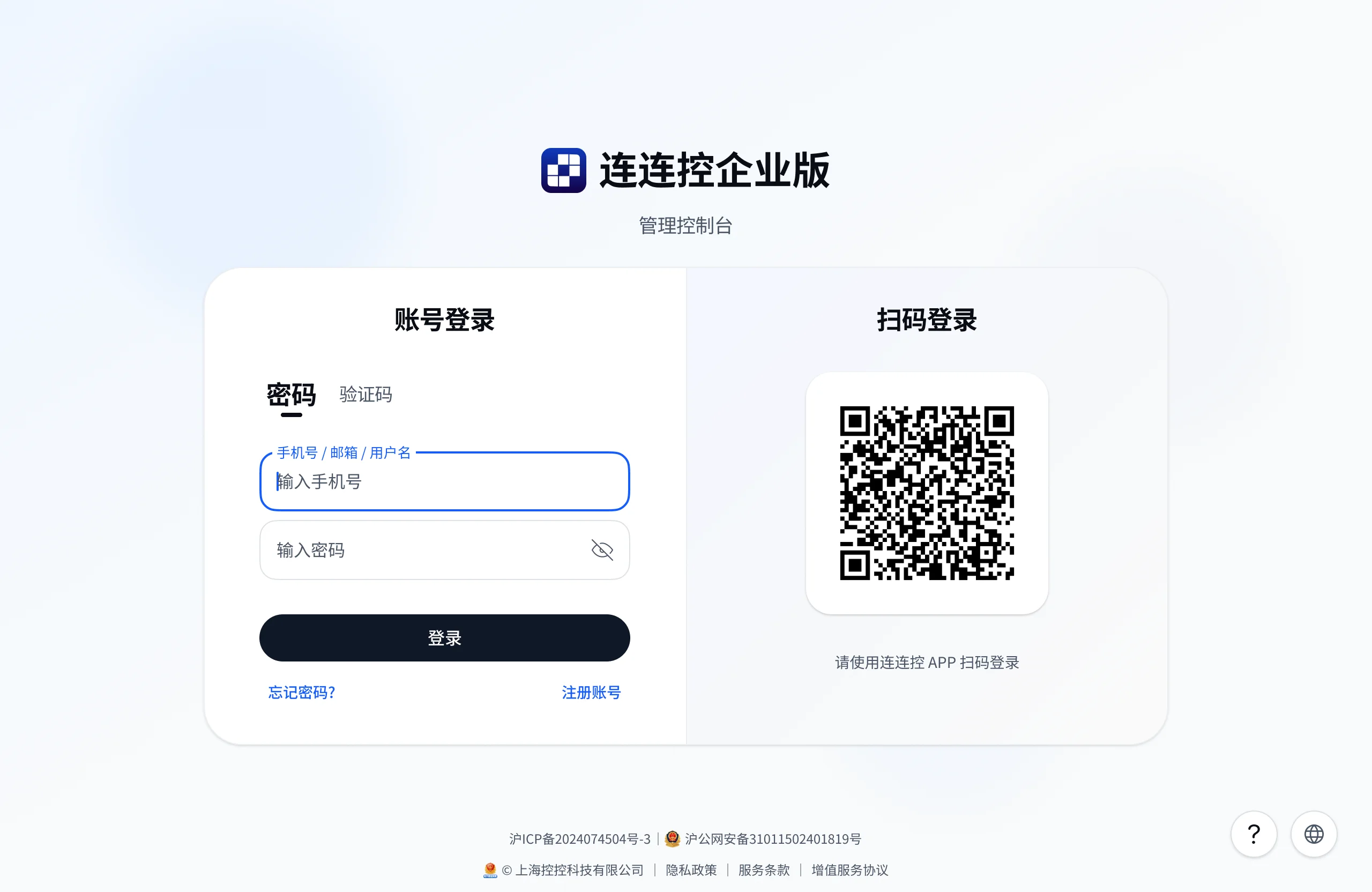
- On the organization list page, select Create Organization;
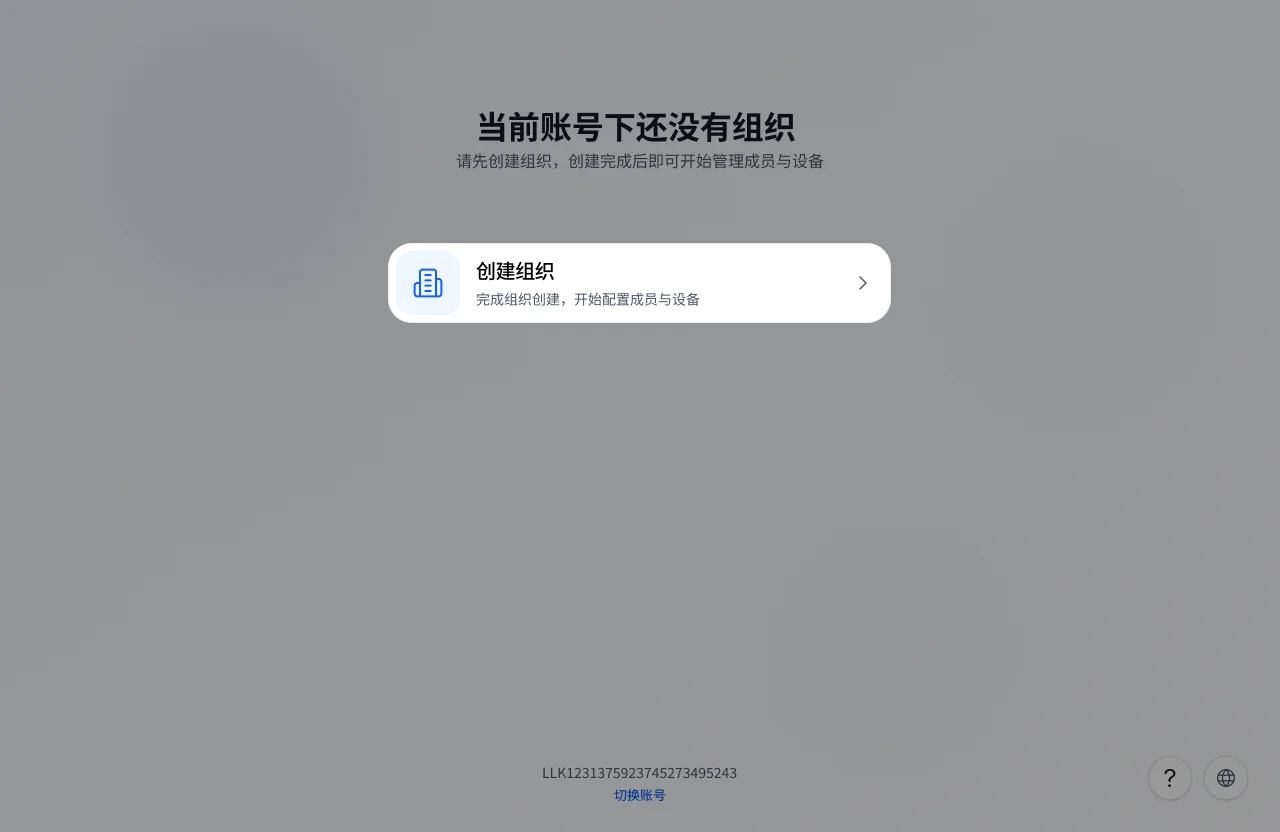
- Fill in the organization information and click Create and Enter;
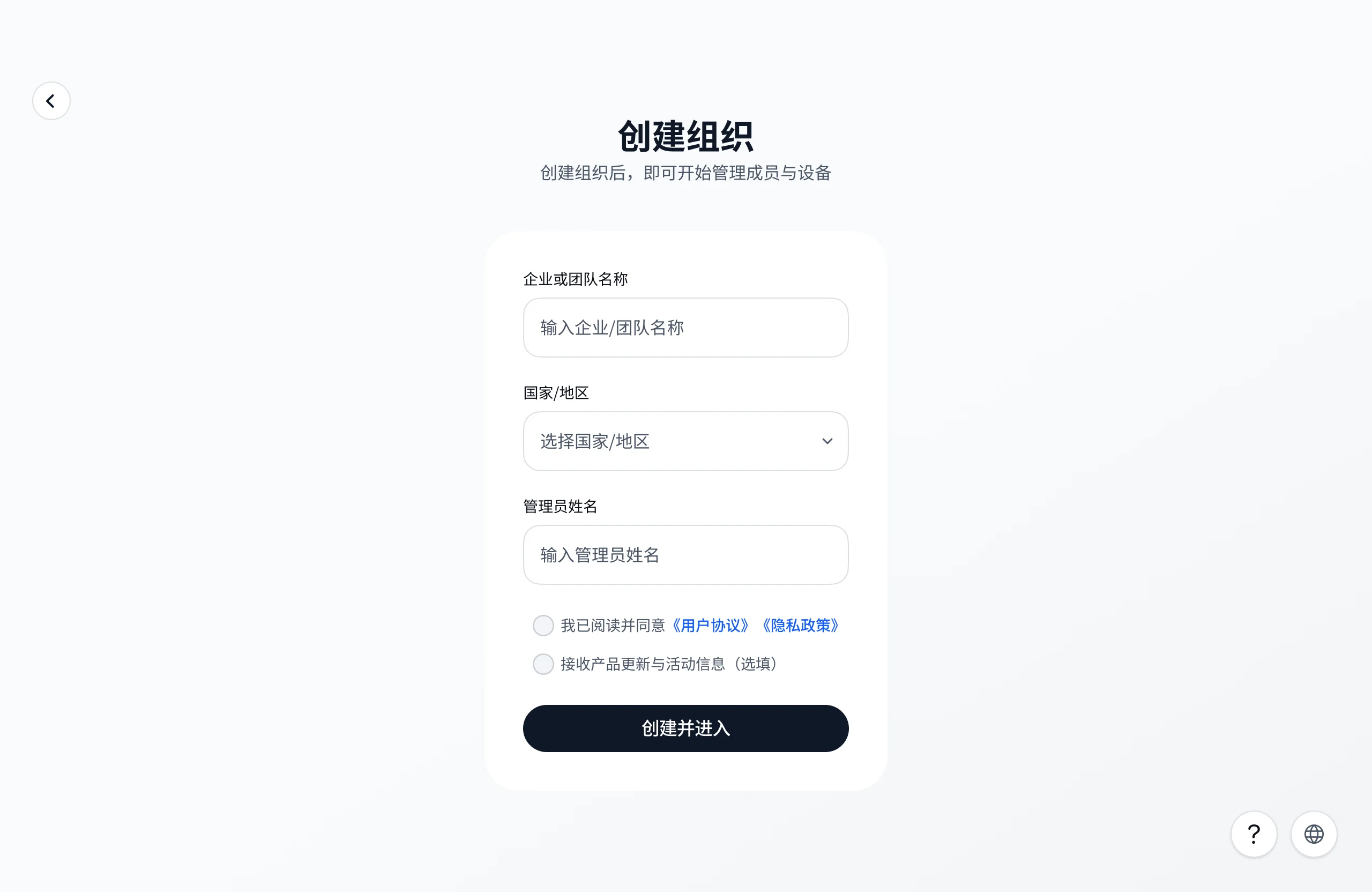
- Follow the page guide to set up two-step verification.
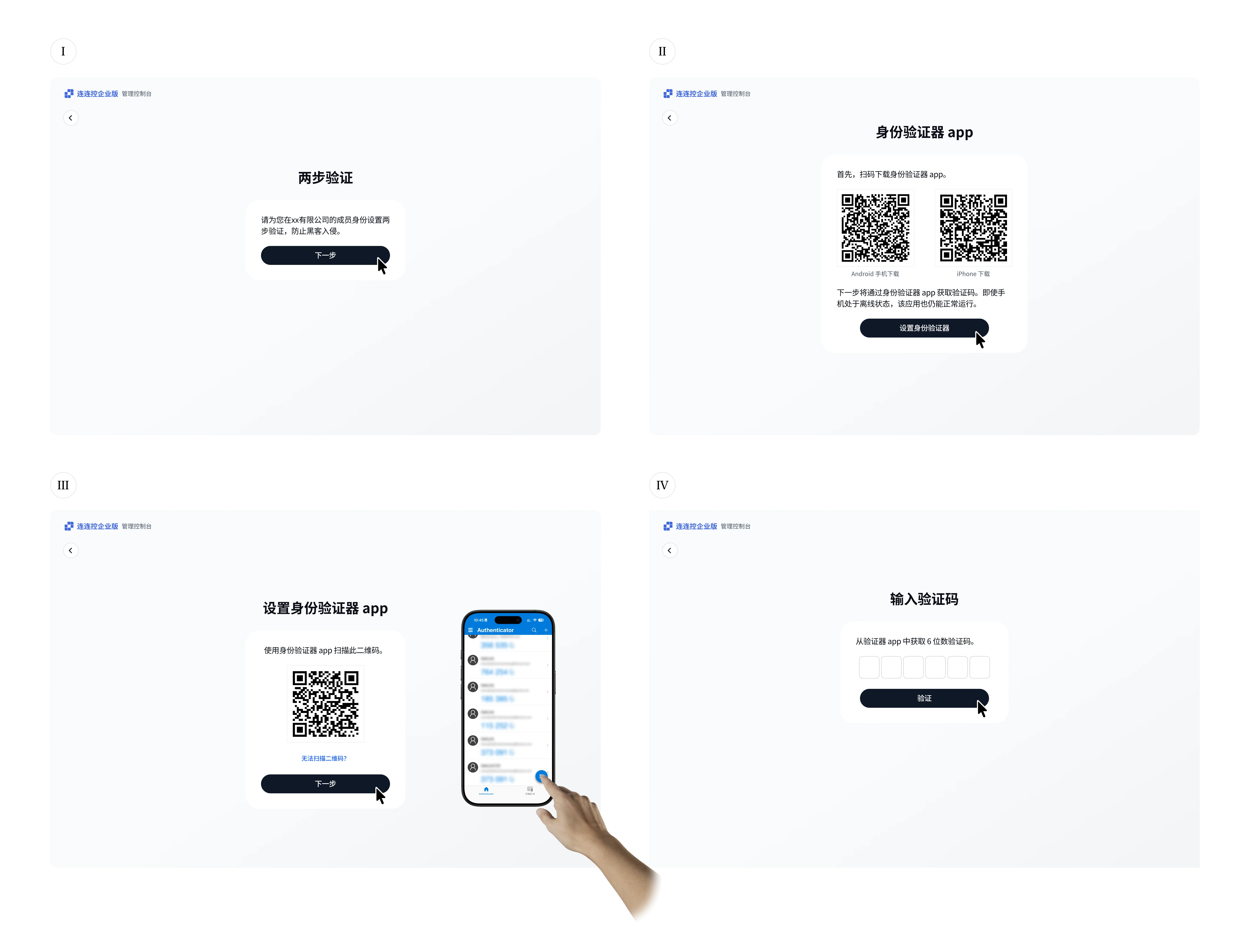
After completion, the administrator enters the newly created enterprise and can continue inviting members, deploying Controlled devices, and configuring permissions.
Log in to an Enterprise
- Go to the Management Console login page and log in to your AskLink account;
- Select the enterprise you want to enter from the organization list;
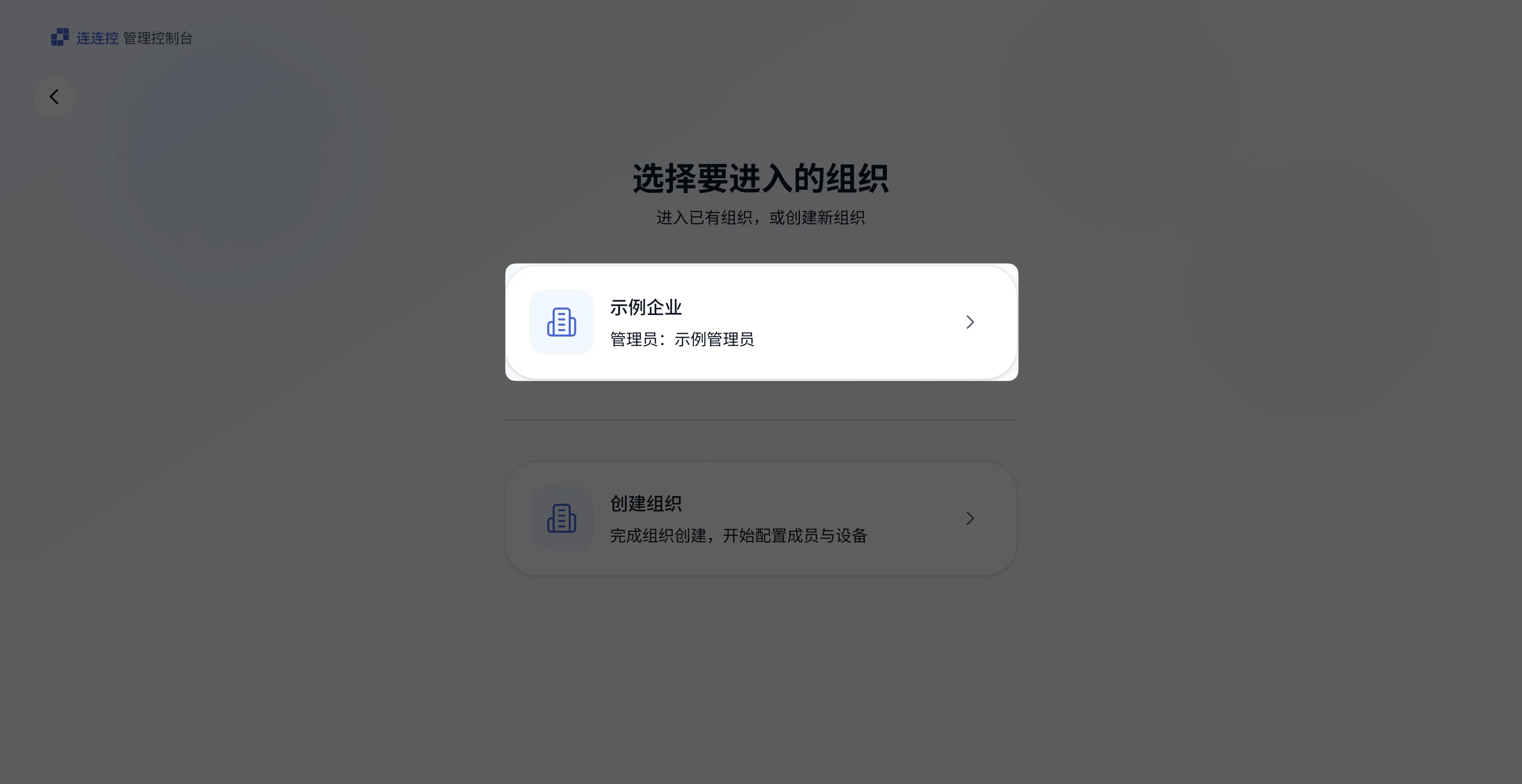
- Follow the page prompts and complete two-step verification using the configured verification method.
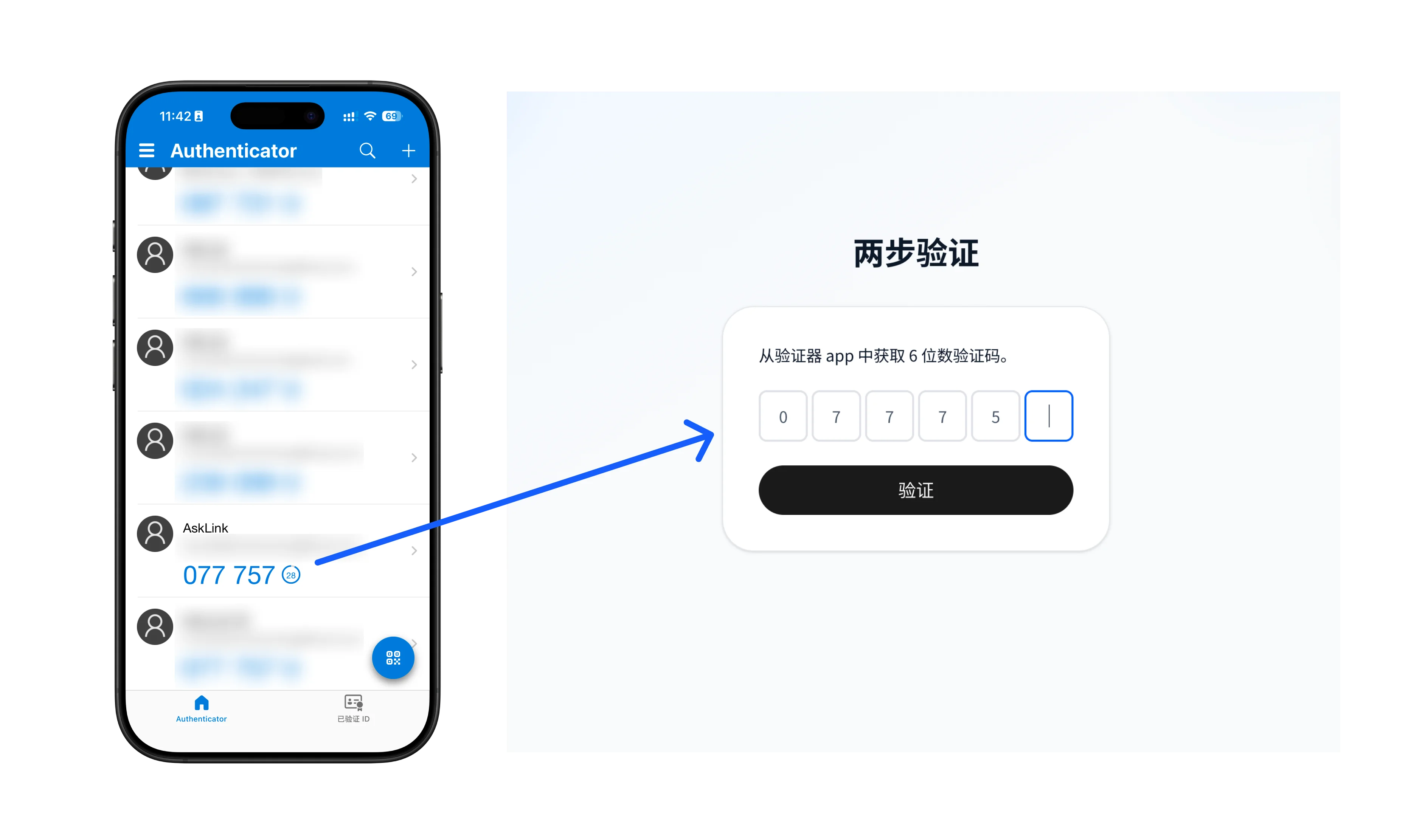
After completion, the administrator can enter the Management Console.
Invite Members to Join the Enterprise
Administrators need to invite members to join the enterprise first. Before members join the enterprise, they cannot use the AskLink Business Controller to access enterprise devices.
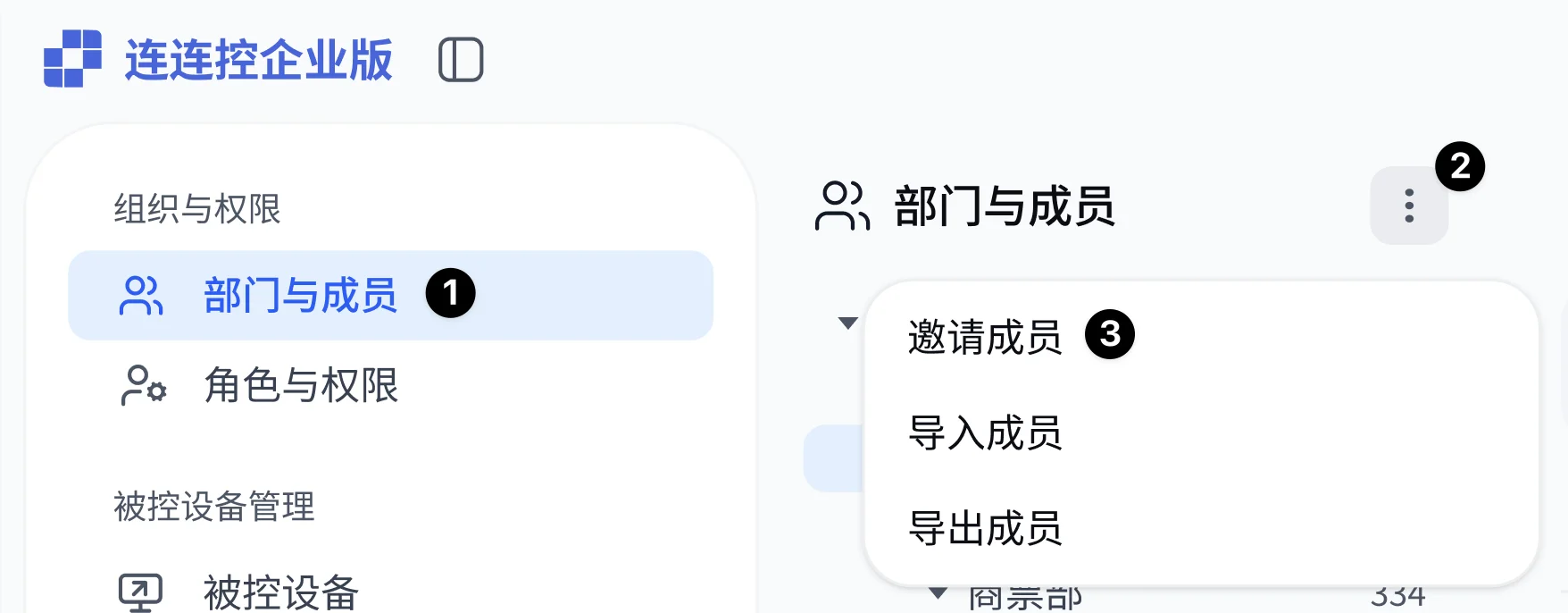
- Select Departments and Members in the left navigation bar;
- Click the More button above the department list;
- In the expanded menu, click Invite Members;
- Fill in the member information and click Send Invitation.
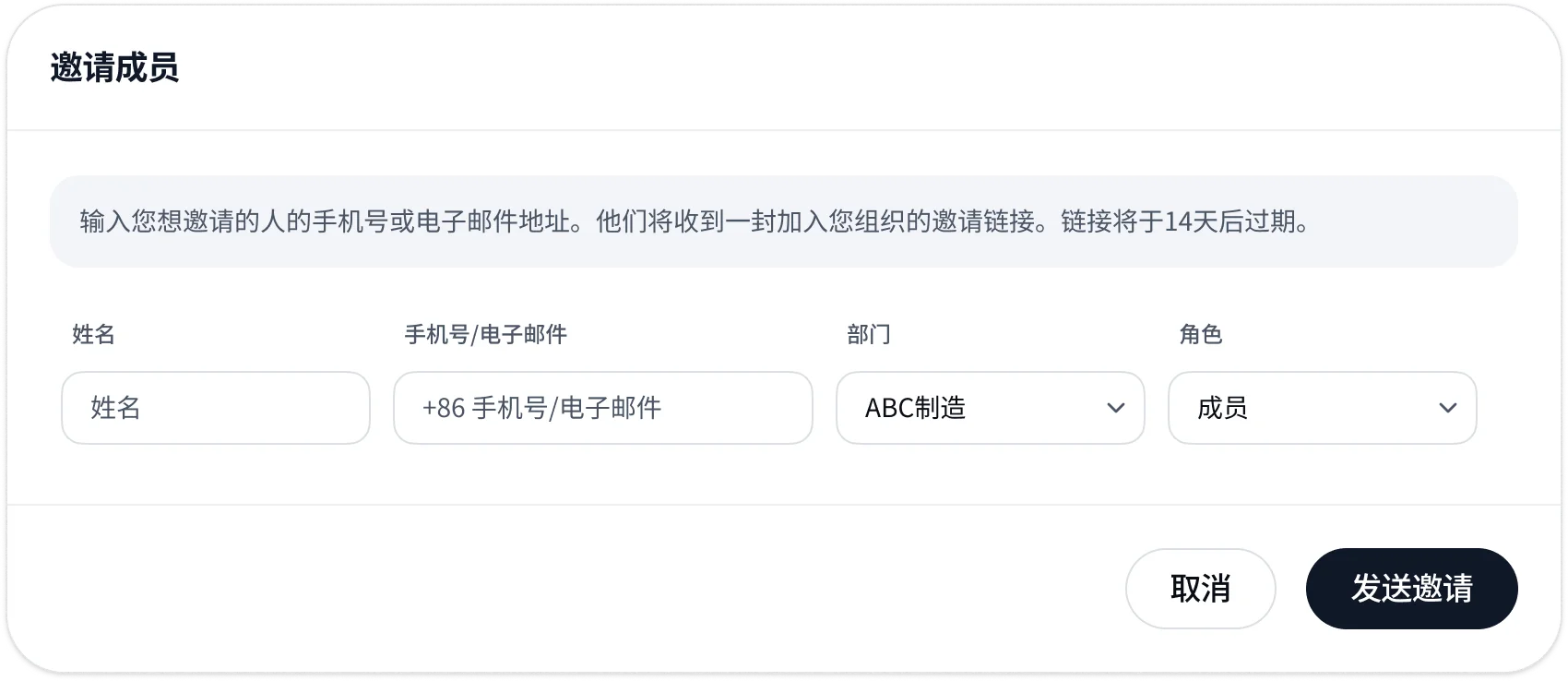
After completion, the member will receive an SMS or email invitation. After the member accepts the invitation and joins the enterprise, the administrator still needs to assign roles and device permissions to the member.
Member Joins an Existing Enterprise
- The member clicks the invitation link in the invitation email or SMS sent by the enterprise administrator;
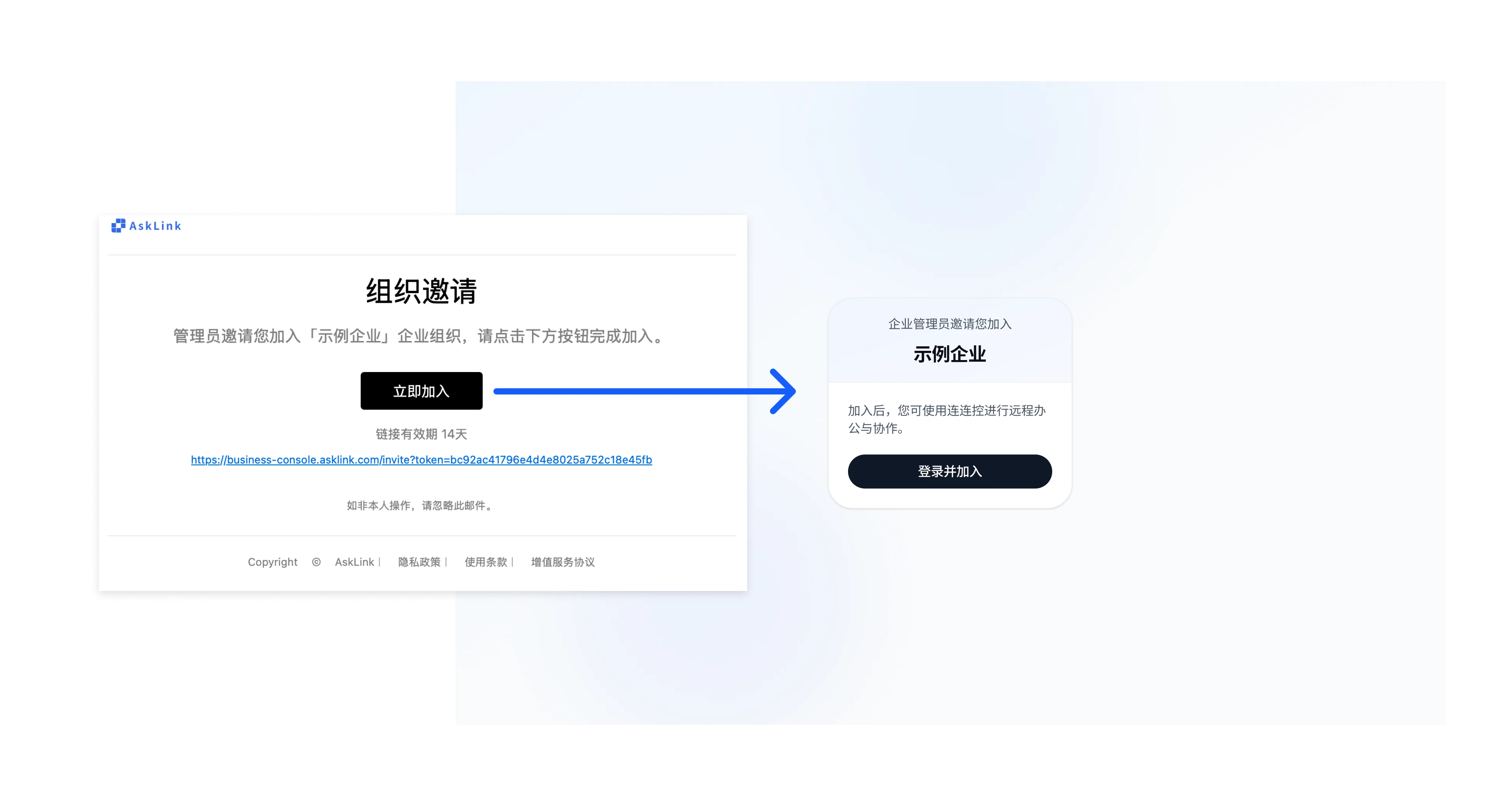
- Follow the page prompts to log in or register an AskLink account;
- Follow the page guide to set up two-step verification.
After completion, the member joins the enterprise.
Guide: If the member still cannot see devices in the AskLink Business Controller after accepting the invitation, contact the administrator to confirm whether roles and device permissions have been assigned.
Deploy AskLink Business Host
- Select Controlled Devices in the left navigation bar of the Management Console;
- Click the More button above the group list;
- In the expanded menu, click Add Device;
- Record the enterprise deployment code;
- Click Download to go to the AskLink Business client download page;
- Download the AskLink Business Host installer for the corresponding operating system;
- Install AskLink Business Host on the target device, enter the enterprise deployment code, and connect it to the enterprise.
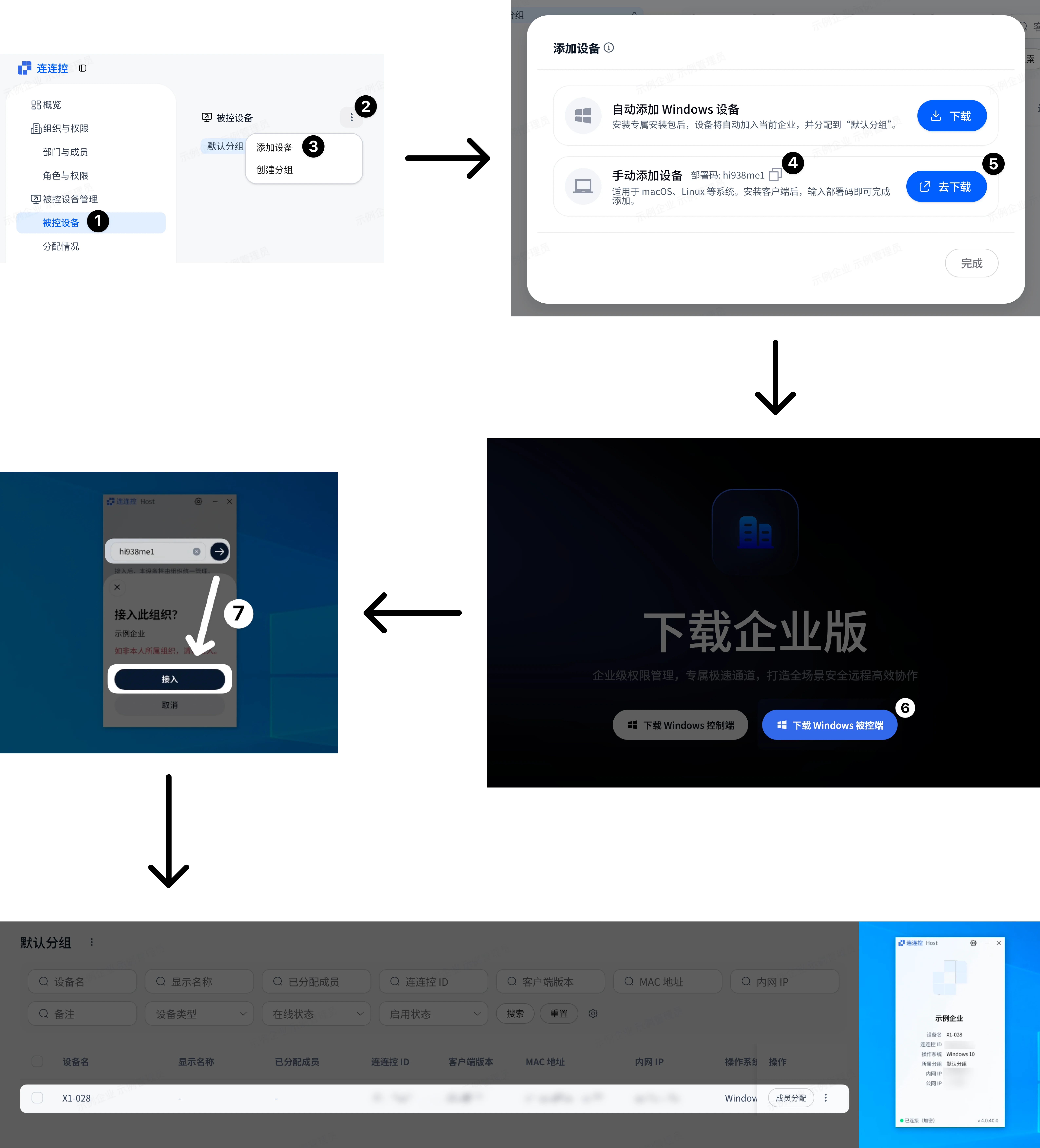
After completion, refresh the Management Console to see the newly connected device in the Controlled device list. New devices enter the Default Group by default.
Configure Roles and Device Permissions
- Select Roles and Permissions in the left navigation bar;
- Create a role and configure permissions;
- Edit the member in Departments and Members and assign the role to the member;
- Authorize the device for the member in Controlled Devices.
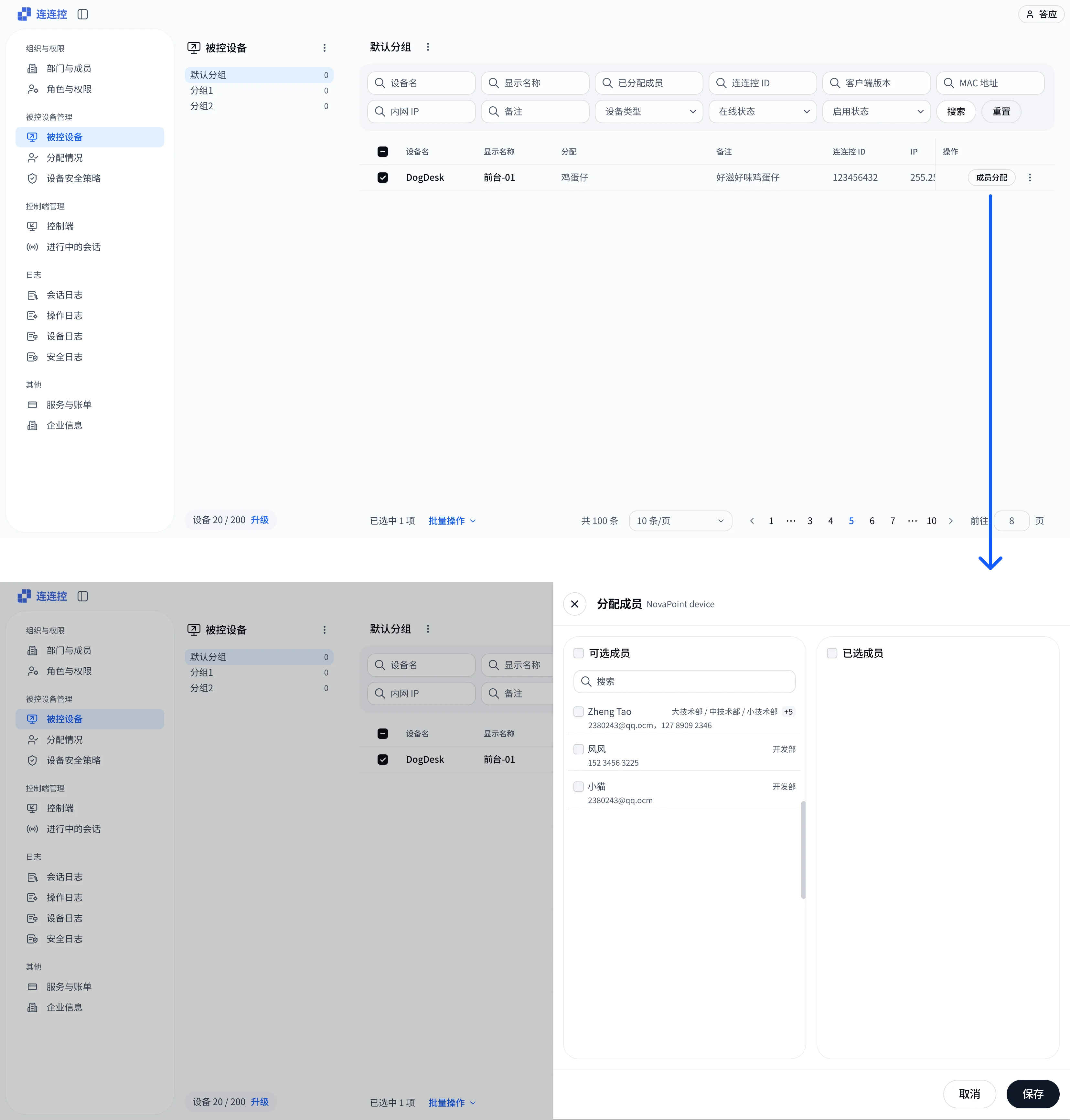
After completion, the member can log in to the AskLink Business Controller to view and connect to authorized devices.
Member Starts Using the AskLink Business Controller
Before using the AskLink Business Controller, the member needs to meet the following conditions:
- The member has joined the enterprise;
- The administrator has assigned a role to the member;
- The administrator has authorized Controlled devices for the member;
- The member has downloaded and logged in to the AskLink Business Controller.
After these conditions are met, the member can view authorized devices in the AskLink Business Controller and initiate remote control, File Transfer, and other operations.