


'%3e%3cpath%20d='M11.0762%2022.1543H20.9223V32.0005H11.0762V22.1543Z'%20fill='%233F67E0'/%3e%3cpath%20d='M0%2022.1543H9.84615V32.0005H4.92308C2.20414%2032.0005%200%2029.7963%200%2027.0774V22.1543Z'%20fill='%233F67E0'/%3e%3cpath%20d='M0%2011.0762H9.84615V20.9223H0V11.0762Z'%20fill='%233F67E0'/%3e%3cpath%20d='M21.7441%200H26.6672C29.3862%200%2031.5903%202.20414%2031.5903%204.92308V9.84615H21.7441V0Z'%20fill='%233F67E0'/%3e%3cpath%20d='M21.7441%2011.0762H31.5903V20.9223H21.7441V11.0762Z'%20fill='%233F67E0'/%3e%3cpath%20d='M10.666%200H20.5122V9.84615H10.666V0Z'%20fill='%233F67E0'/%3e%3cpath%20d='M145.348%2025.4012L141.315%2019.0185H139.485L144.829%2011.7453H149.529L144.457%2018.598V16.4209L150.37%2025.4012H145.348ZM135.65%2025.4012V7.3418H140.153V25.4012H135.65Z'%20fill='white'/%3e%3cpath%20d='M118.672%2025.4V11.7441H122.235V17.6073H122.036C122.036%2016.1889%20122.217%2015.018%20122.581%2014.0943C122.943%2013.1543%20123.479%2012.4534%20124.188%2011.9916C124.914%2011.5297%20125.788%2011.2988%20126.811%2011.2988H127.009C128.559%2011.2988%20129.755%2011.8184%20130.596%2012.8574C131.454%2013.8799%20131.882%2015.455%20131.882%2017.5826V25.4H127.38V17.4588C127.38%2016.8321%20127.19%2016.3209%20126.811%2015.925C126.448%2015.5127%20125.945%2015.3065%20125.302%2015.3065C124.658%2015.3065%20124.139%2015.5127%20123.743%2015.925C123.364%2016.3209%20123.174%2016.8486%20123.174%2017.5083V25.4H118.672Z'%20fill='white'/%3e%3cpath%20d='M110.117%2025.4011V11.7453H114.619V25.4011H110.117ZM108.385%2015.0108V11.7453H114.619V15.0108H108.385ZM111.972%2010.6567C111.147%2010.6567%20110.537%2010.4506%20110.141%2010.0383C109.762%209.60953%20109.572%209.06528%20109.572%208.40551C109.572%207.74584%20109.762%207.20983%20110.141%206.79751C110.537%206.3687%20111.139%206.1543%20111.947%206.1543C112.772%206.1543%20113.374%206.3687%20113.753%206.79751C114.132%207.20983%20114.322%207.74584%20114.322%208.40551C114.322%209.06528%20114.132%209.60953%20113.753%2010.0383C113.374%2010.4506%20112.78%2010.6567%20111.972%2010.6567Z'%20fill='white'/%3e%3cpath%20d='M95.0391%2025.4012V7.3418H99.6405V25.4012H95.0391ZM99.1457%2025.4012V21.3935H106.469V25.4012H99.1457Z'%20fill='white'/%3e%3cpath%20d='M87.4397%2025.4012L83.4077%2019.0185H81.5768L86.9204%2011.7453H91.6211L86.5495%2018.598V16.4209L92.4621%2025.4012H87.4397ZM77.7422%2025.4012V7.3418H82.2451V25.4012H77.7422Z'%20fill='white'/%3e%3cpath%20d='M68.5278%2025.8466C66.5487%2025.8466%2064.9901%2025.4425%2063.8521%2024.6344C62.7142%2023.8098%2062.1039%2022.6553%2062.0215%2021.1709H65.9796C66.0457%2021.5832%2066.3013%2021.9378%2066.7466%2022.2347C67.1919%2022.5316%2067.8186%2022.68%2068.6268%2022.68C69.204%2022.68%2069.6988%2022.5975%2070.1111%2022.4326C70.5399%2022.2512%2070.7543%2021.9626%2070.7543%2021.5667C70.7543%2021.2204%2070.5894%2020.94%2070.2595%2020.7256C69.9297%2020.4947%2069.3277%2020.3381%2068.4536%2020.2556L67.5135%2020.1567C65.7652%2019.9752%2064.4788%2019.497%2063.6542%2018.7218C62.8296%2017.9466%2062.4173%2016.9736%2062.4173%2015.8026C62.4173%2014.7966%2062.6647%2013.9719%2063.1595%2013.3287C63.6542%2012.669%2064.3387%2012.1742%2065.2128%2011.8444C66.0869%2011.5145%2067.0847%2011.3496%2068.2062%2011.3496C70.0368%2011.3496%2071.5129%2011.7536%2072.6344%2012.5618C73.756%2013.3535%2074.3497%2014.4997%2074.4157%2016.0005H70.4574C70.3915%2015.5882%2070.1688%2015.2419%2069.7894%2014.9615C69.4101%2014.6646%2068.8659%2014.5162%2068.1567%2014.5162C67.6454%2014.5162%2067.2248%2014.6069%2066.895%2014.7883C66.5816%2014.9697%2066.425%2015.2254%2066.425%2015.5552C66.425%2015.9016%2066.5734%2016.1572%2066.8703%2016.3221C67.1837%2016.487%2067.6784%2016.6107%2068.3546%2016.6932L69.2947%2016.7922C71.0429%2016.9736%2072.387%2017.4601%2073.3271%2018.2518C74.2837%2019.0269%2074.762%2020.0494%2074.762%2021.3193C74.762%2022.2595%2074.5063%2023.0676%2073.9951%2023.7438C73.5003%2024.42%2072.7828%2024.9395%2071.8428%2025.3023C70.9192%2025.6652%2069.8142%2025.8466%2068.5278%2025.8466Z'%20fill='white'/%3e%3cpath%20d='M41.4355%2025.4012L47.2244%207.3418H54.5967L60.5834%2025.4012H55.8336L51.1827%2010.5579L52.4938%2011.0526H49.2283L50.5642%2010.5579L46.037%2025.4012H41.4355ZM46.1606%2021.2203L47.5461%2017.46H54.3987L55.7841%2021.2203H46.1606Z'%20fill='white'/%3e%3c/g%3e%3cdefs%3e%3cclipPath%20id='clip0_809_55652'%3e%3crect%20width='150.974'%20height='32'%20fill='white'/%3e%3c/clipPath%3e%3c/defs%3e%3c/svg%3e "AskLink")
Contrôle à distance des appareils Android
AskLink permet de démarrer des sessions de contrôle à distance sur des appareils Android. Cet article explique comment contrôler un appareil Android avec AskLink.
Activer les autorisations requises pour contrôler un appareil Android
Avant qu'un appareil Android puisse être contrôlé, vous devez compléter la configuration des autorisations requises.
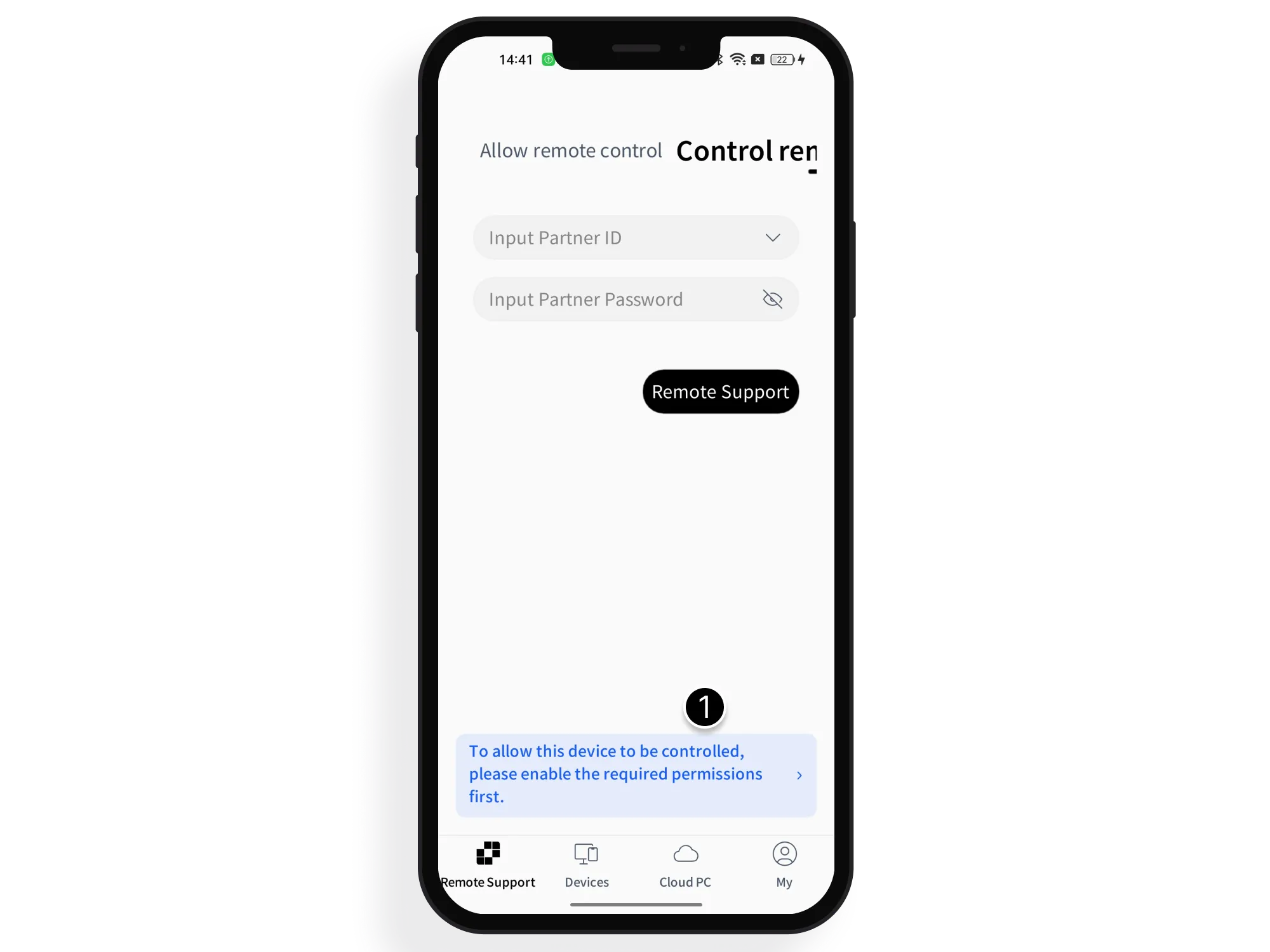
- Sur la page Assistance à distance, appuyez sur la barre bleue située en bas et indiquant « Pour contrôler cet appareil à distance, veuillez d'abord activer les autorisations requises ».
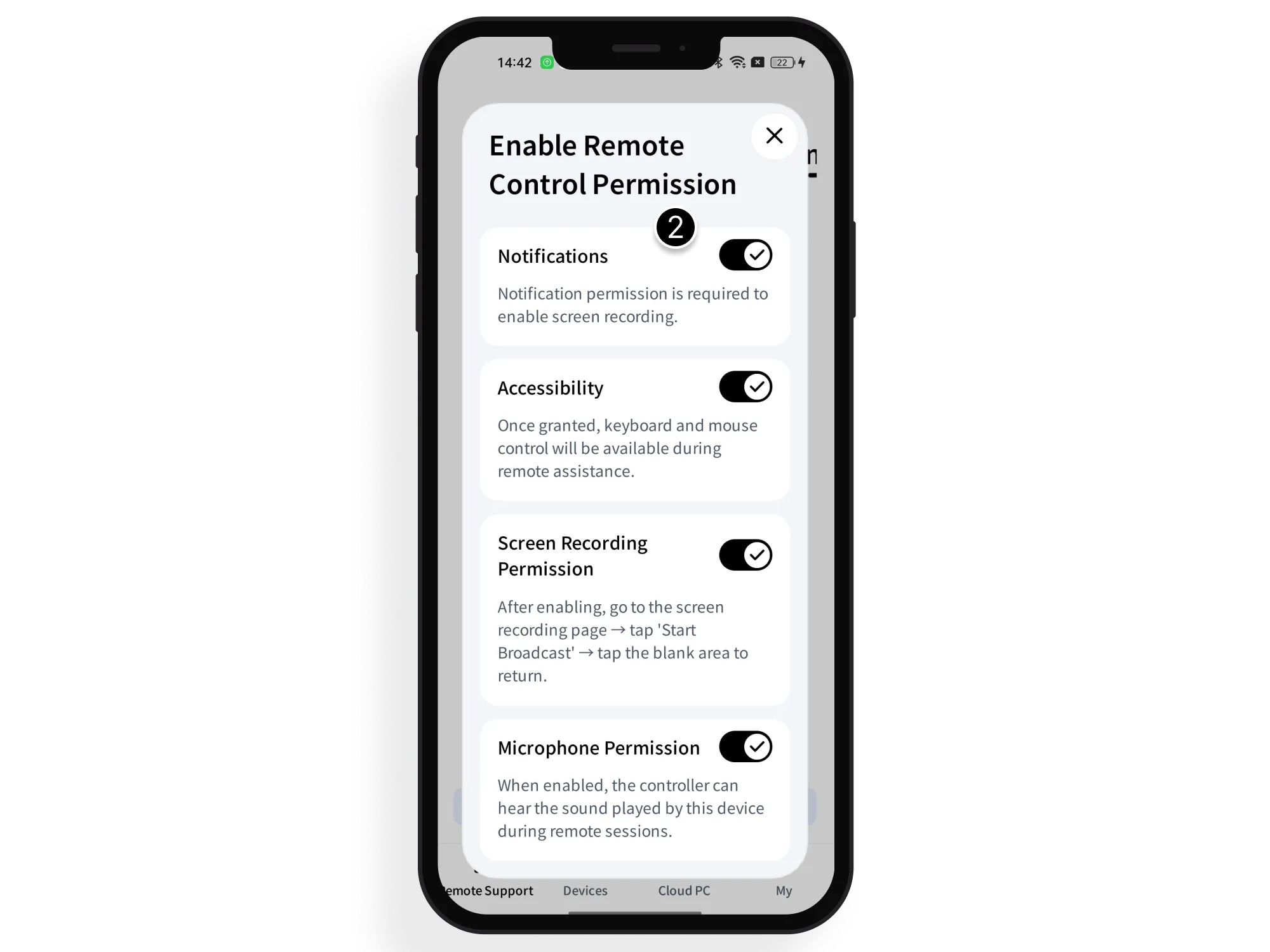
- Sur la page Activer les autorisations de contrôle, suivez les instructions affichées et activez chaque interrupteur afin d'accorder toutes les autorisations requises.
- Le chemin d'activation de ces autorisations peut varier selon la version du système et la marque de l'appareil. Les exemples suivants montrent comment les activer sur plusieurs marques courantes.
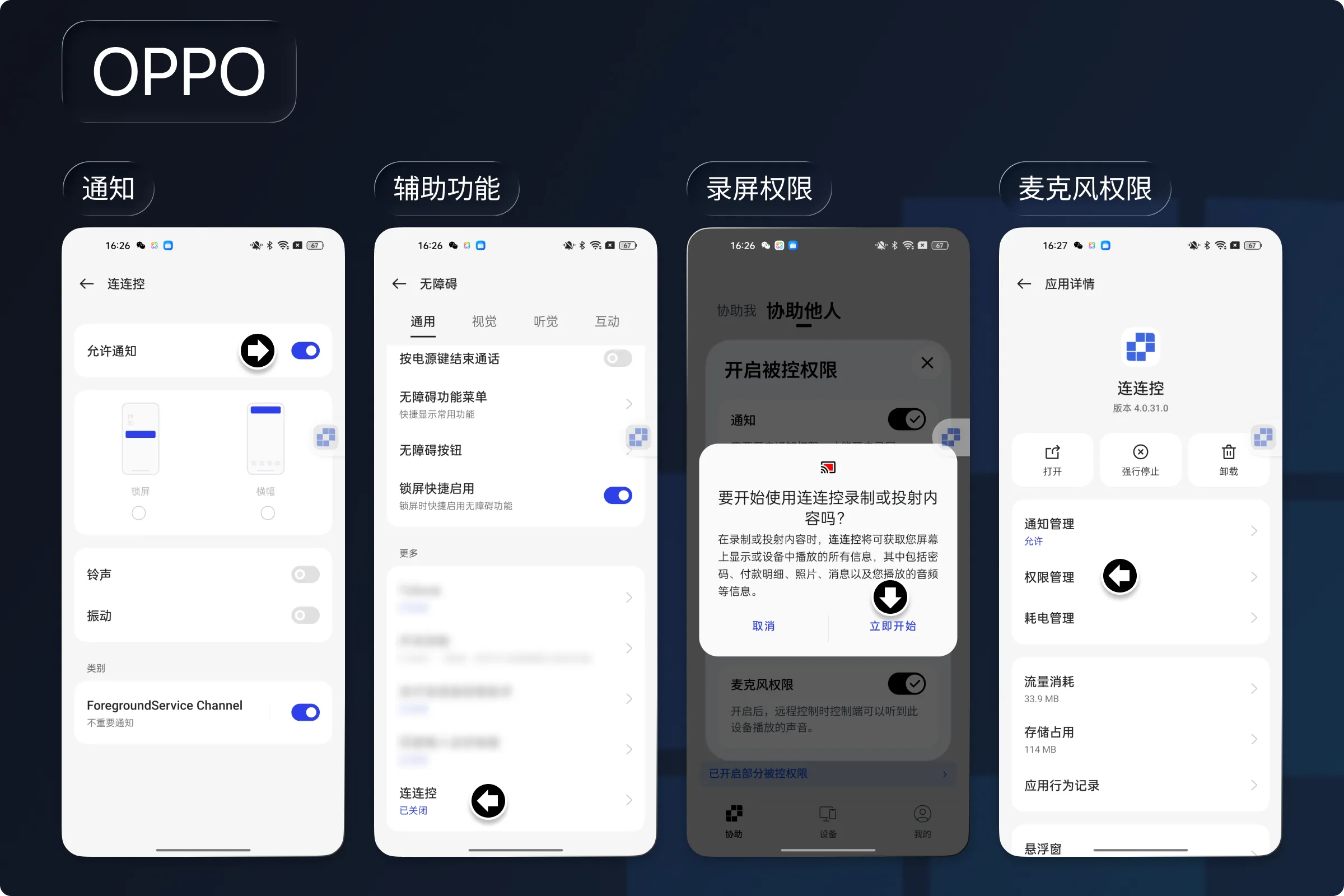
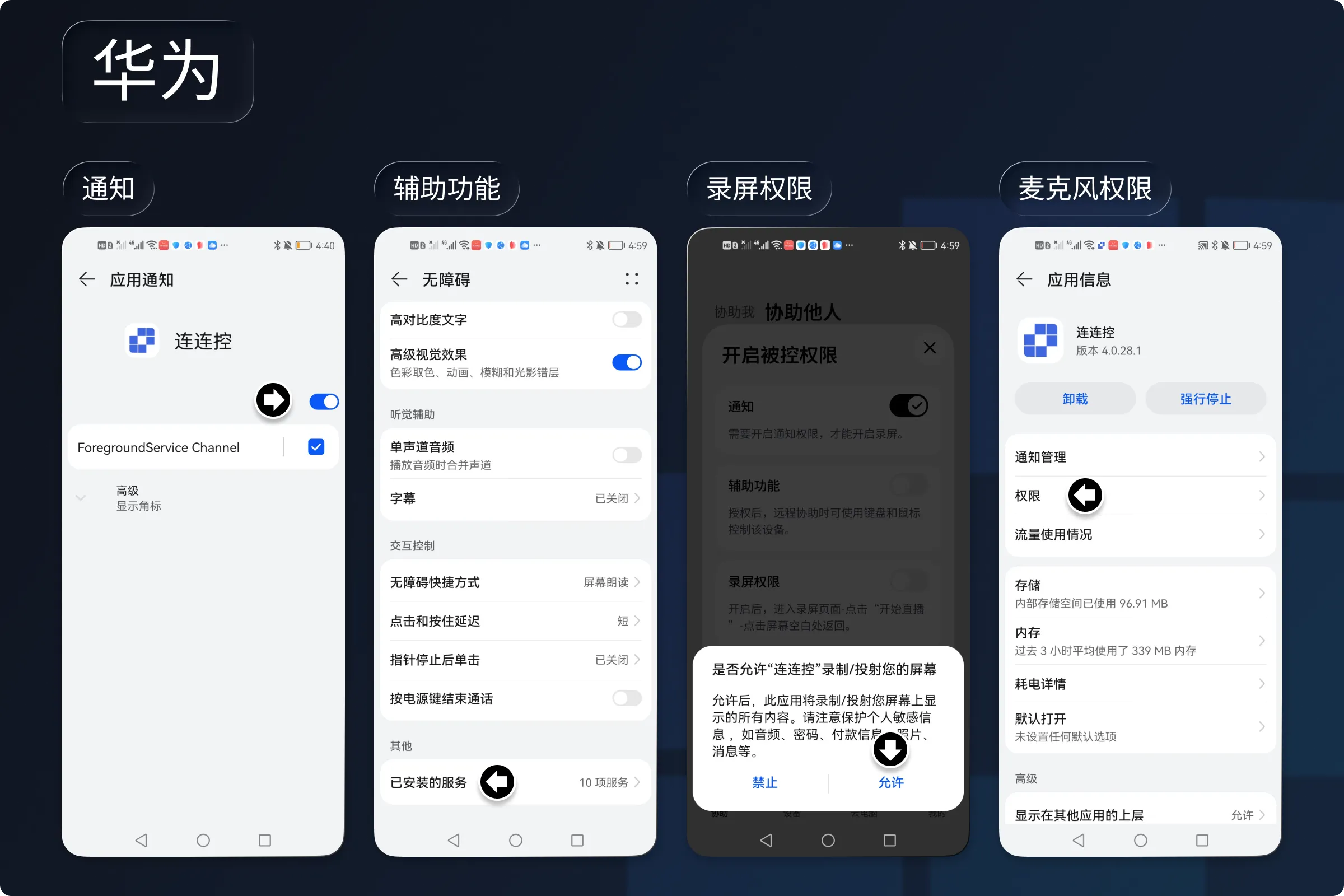
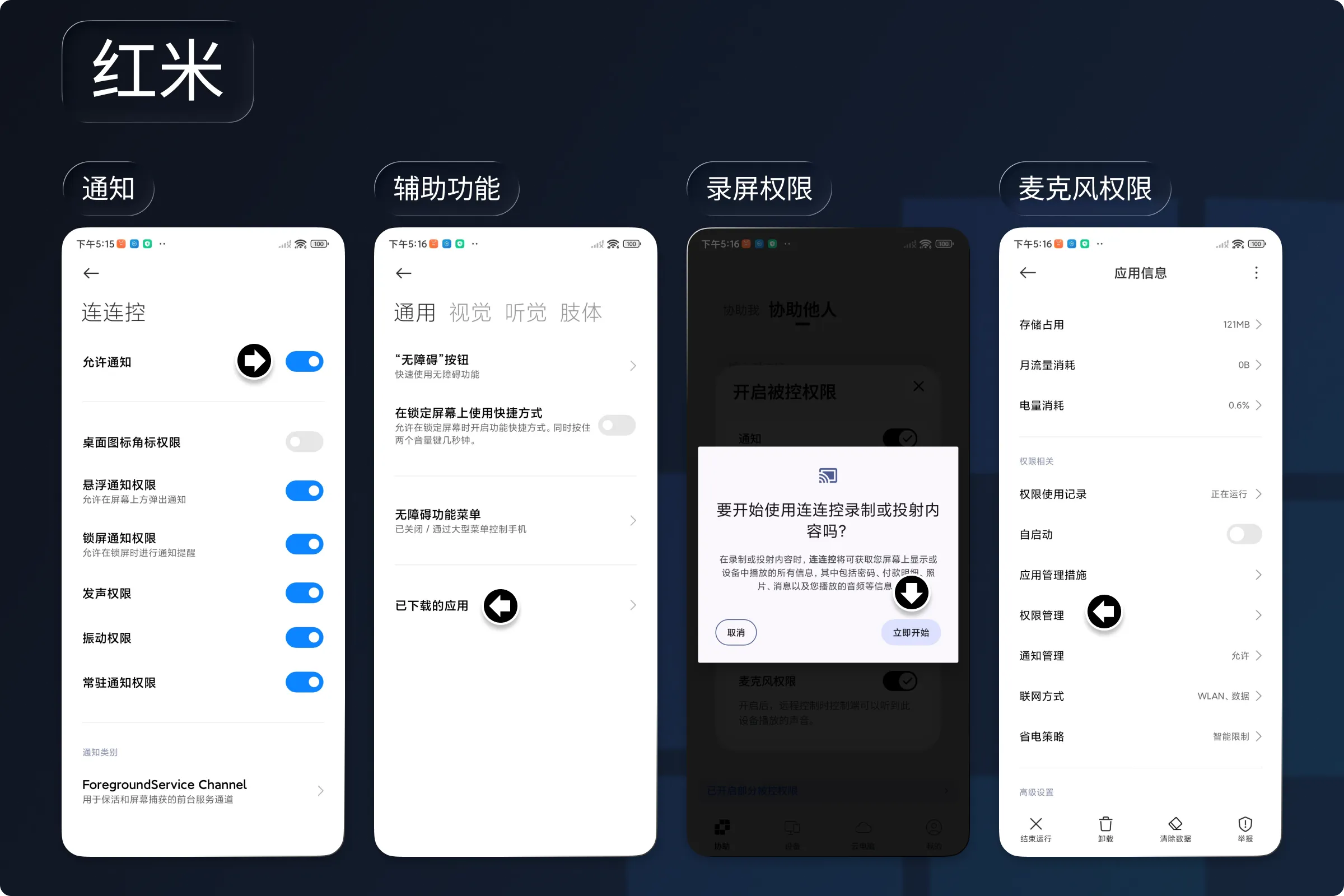
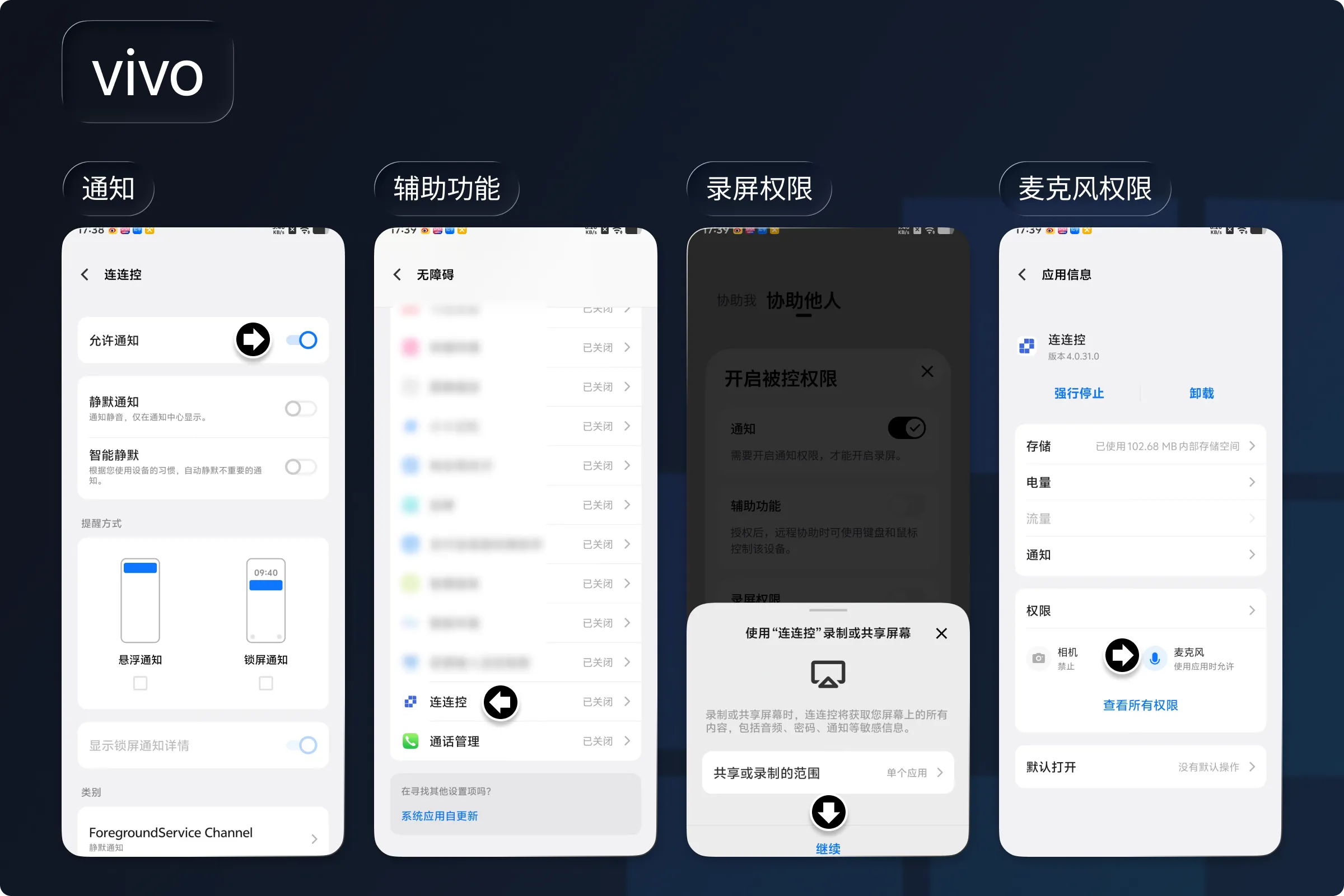
Remarques :
- Après la fermeture et le redémarrage d'AskLink, certaines autorisations (par exemple, l’Accessibilité et l’enregistrement d’écran) peuvent devoir être réactivées.
Demander une assistance à distance via ID et mot de passe
Lorsque vous avez besoin de l'aide d'une autre personne, communiquez-lui l'ID de l'appareil et le Mot de passe temporaire afin de lui accorder temporairement l'autorisation de le contrôler et de vous assister.
Comment trouver l'ID et le mot de passe
- Ouvrez le client AskLink et accédez à l’écran Assistance à distance.
- Vérifiez l’ID de l’appareil et le mot de passe temporaire.
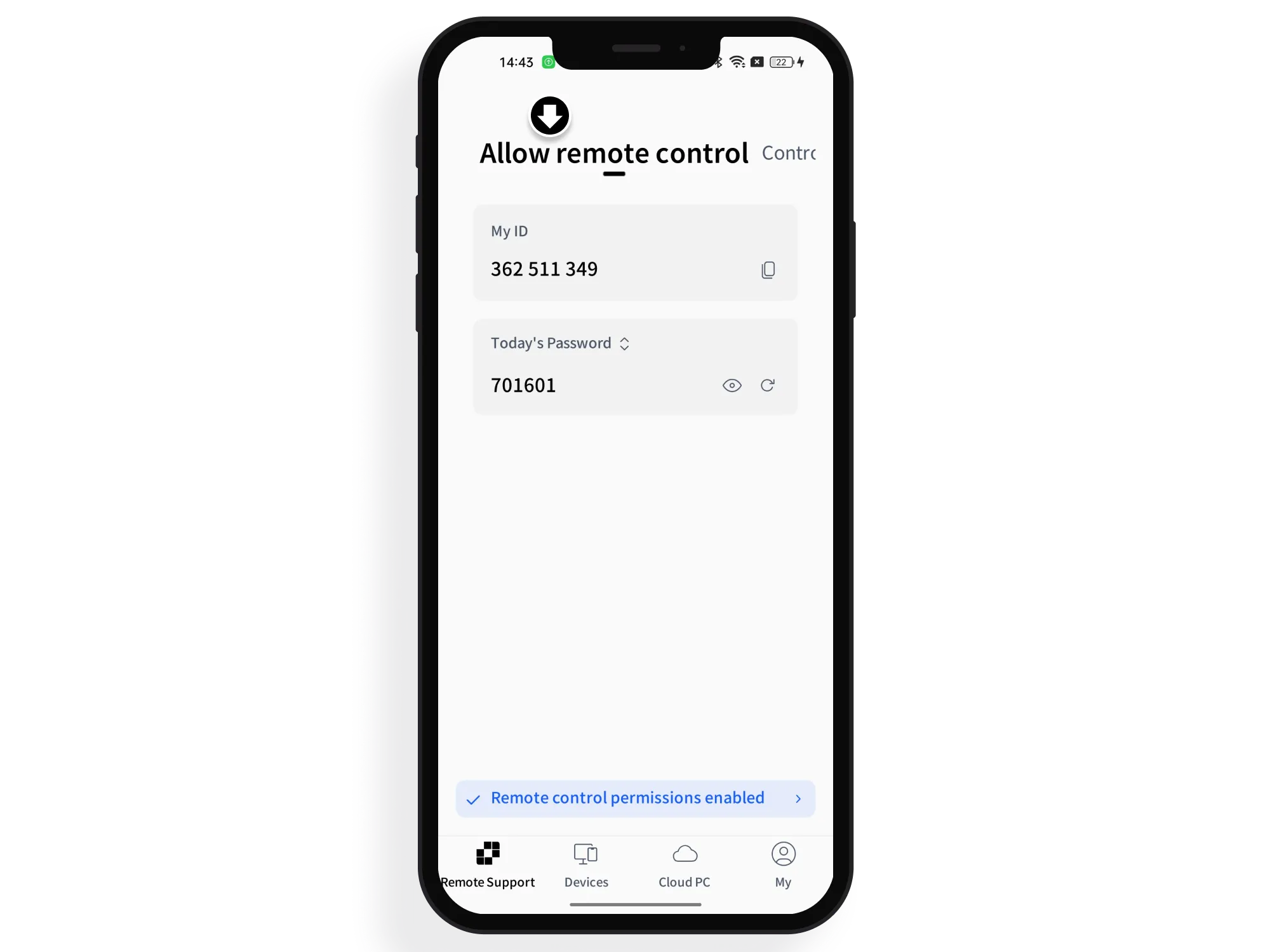
Demander une assistance
Communiquez l'ID de l'appareil et le Mot de passe temporaire à la personne qui vous assiste afin qu'elle puisse lancer une session de contrôle à distance.
Être contrôlé depuis la Liste des appareils
Une fois connecté sur l'appareil avec le même compte que sur le Contrôleur, sélectionnez le rôle Contrôlé. L'appareil est alors automatiquement ajouté à la Liste des appareils du Contrôleur. Grâce à la vérification du compte, le Contrôleur peut ensuite lancer en un clic une session de contrôle à distance sans mot de passe, sans avoir à enregistrer ni à mémoriser un mot de passe de connexion distinct.
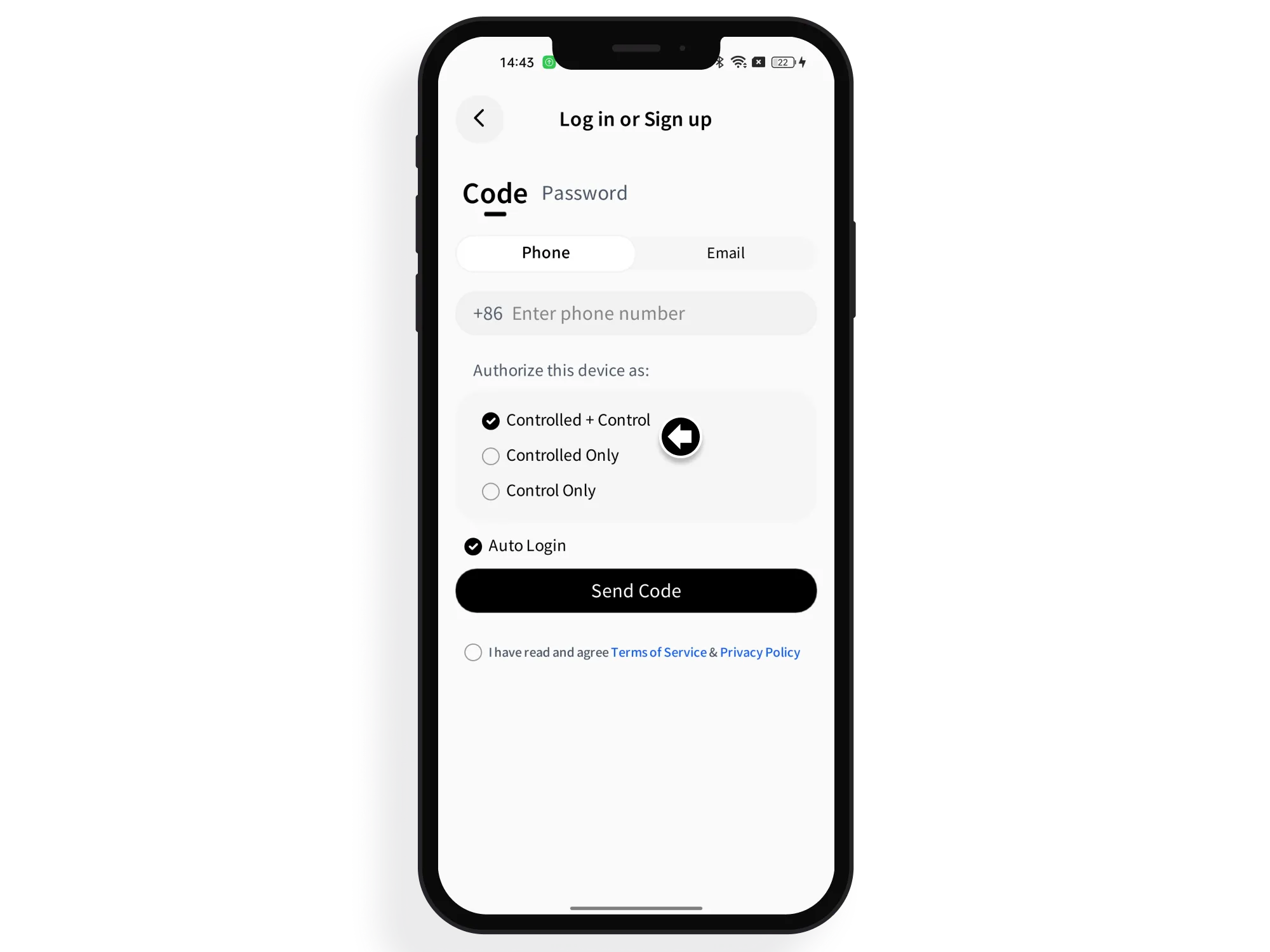
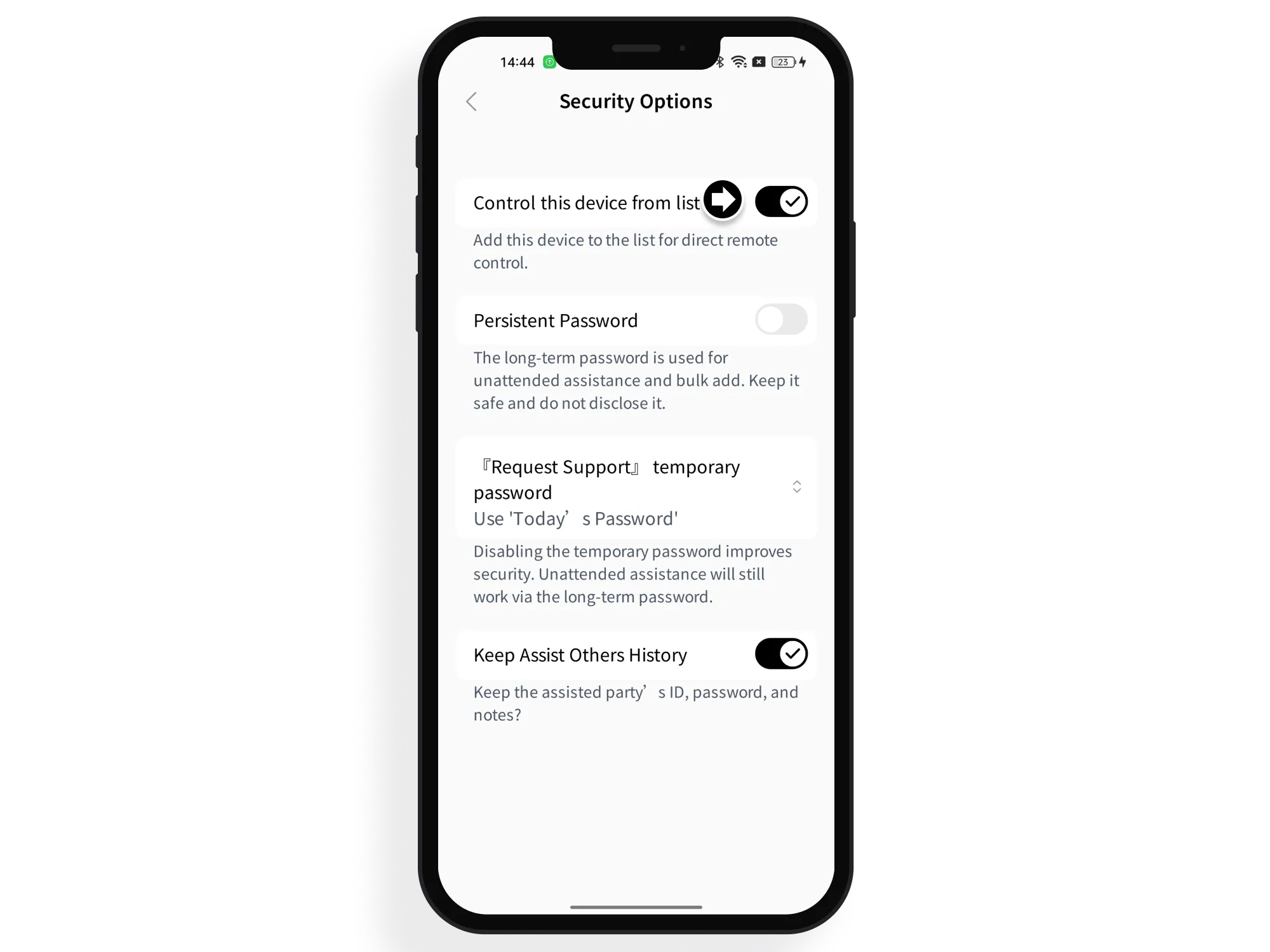
Si l’appareil n’est pas actuellement connecté en tant que Contrôlé, vous pouvez accéder aux Paramètres à tout moment pour le réactiver.
- Appuyez sur Moi > Options de sécurité.
- Activez l’option Contrôler cet appareil depuis la liste.
Remarques :
- Pendant le contrôle à distance, le système bloque certains contenus susceptibles de porter atteinte à la vie privée.